Hey there, let’s cut to the chase: if you’re shopping for a UV flatbed printer, one of the first questions you’re definitely Googling is, “What’s its actual printing speed?” And if you’ve been scrolling around, you’ve probably seen a bunch of super vague answers — like “it prints fast!” or some random number that doesn’t fit your specific needs. As a UV flatbed printer supplier, I get it — speed isn’t a one-size-fits-all metric. I’ve talked to so many buyers who show up thinking they need the fastest machine on the market, only to realize it’s overkill for what they’re actually printing. Let me break this down like we’re hanging out in my warehouse (which we do pretty often, honestly), no fancy jargon, no fluff. UV Flatbed Printer
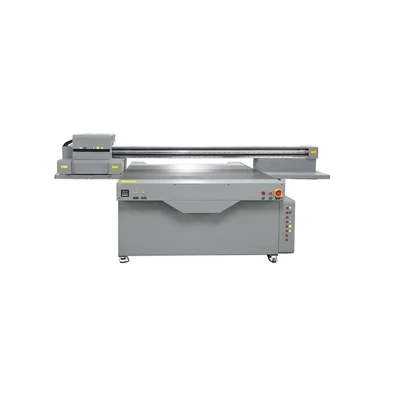
First off, let’s get one thing straight: UV flatbed printer speed isn’t a single number plastered on a spec sheet. It’s tied to three huge factors: what you’re printing, what settings you’re using, and the specific model of the machine. Let’s start with the “what you’re printing” part because that’s the biggest gotcha. I’ve had a customer come in raving that their old printer can crank out 10 2ft x 3ft signs in an hour — only to admit that’s just solid, single-color text. If they try to print a photo with 16 million colors, gradients, and fine details on a custom acrylic plaque? That same machine takes 2-3 hours for one sign. So speed isn’t measured in just “pages per hour” (PPH) for complex jobs. It’s also about square footage per hour (sq ft/h), which is way more useful for actual production.
Let’s talk about job type first, because that’s where most people get confused. Let’s split jobs into three categories: simple, mid, and complex. Simple jobs are the no-fuss stuff — think solid-color logos, big block text, maybe a single graphic with no gradients. For these, most entry-level UV flatbed models (think for small shops, like 1.2m x 1.6m bed size) can pump out 50-70 sq ft per hour at high speed. Wait, but if you bump to a mid-range or industrial model? That jumps to 100-150 sq ft/h for simple jobs. For example, last month a local sign shop got our entry-level model and was printing 20 real estate yard signs (each 2ft x 3ft, solid color) in about 40 minutes — that’s exactly what they needed, no extra cost for speed they didn’t use.
Mid-range jobs are where it starts to vary. These are jobs with a little more detail: maybe a product box with a company logo, a photo of a dog on a custom tumbler, or a small wall mural with soft gradients. Here, speed drops to 20-40 sq ft/h for entry-level, 50-80 sq ft/h for industrial. I had a customer who prints custom phone cases — each case is a small, detailed photo with a border. On our industrial model, he can print 12 cases per minute? No, wait, 12 cases per hour? No, wait, let me get that right — each case is 5in x 3in, so 0.1 sq ft. At 60 sq ft/h, that’s 600 cases per hour. Yeah, that works. He used to use a DTG printer that only did 100, so that’s a huge jump, but that’s mid-range for him.
Then there’s complex jobs — the fine-art prints, the high-detail photos, jobs with white ink layering (like printing on black acrylic or glass), or even jobs with variable data (like customizing 1000 mugs with different names). For these, speed is way lower: entry-level models might do 5-15 sq ft/h, industrial 25-40 sq ft/h. White ink is a big speed killer here — it’s thicker, so the printer has to lay down extra layers, and it needs time to cure properly with UV light so it doesn’t smudge. Last month, a fine-art photographer came to us because his old printer would take 2 hours to print a 2ft x 3ft canvas with a high-res photo. Our industrial model did it in 45 minutes, and the quality was way better. That’s the difference between models, too — but more on that later.
Now, let’s talk about settings, because this is another thing no one mentions. Every printer has different mode settings: Draft, Standard, High, and Ultra-High. Draft mode is for quick proofs, where you skip some layers, use fewer ink drops, so it’s fast but not super detailed. Standard mode is what you use for most production jobs — balances speed and quality. High mode is for detailed jobs, Ultra-High is for fine art or things that need to look crisp up close. For example, our entry-level model does 70 sq ft/h in Draft, 50 sq ft/h in Standard, 25 sq ft/h in High, and only 12 sq ft/h in Ultra-High. That’s a massive drop just from switching settings. I always tell buyers: don’t run your production jobs in Ultra-High unless you absolutely need to — it’s a waste of time and ink.
Then there’s the model itself. I sell a range of UV flatbed printers, from the small 60cm x 90cm bench-top ones for hobbyists or tiny shops, up to the huge 3m x 2m industrial ones for big production facilities. Let’s break down their typical speeds in Standard mode (since that’s what most people use):
- Bench-top (small hobby/startup): 10-30 sq ft/h. Good for people who print small jobs (like phone cases, keychains, small stickers) — you don’t need a huge bed or fast speed here. I had a guy who bought one to print custom pet tags for his Etsy shop, and he was doing 20 tags an hour, which was perfect for his side hustle.
- Entry-level (small shop, 1.2m x 1.6m bed): 40-60 sq ft/h. This is the sweet spot for most sign shops, small marketing agencies, or custom print studios. They can handle 2ft x 3ft signs, small murals, acrylic displays, and all the regular stuff.
- Mid-range (growing shop, 1.6m x 2.5m bed): 70-110 sq ft/h. For shops that are scaling — maybe adding more staff, taking on larger bulk orders, like custom packaging or large banners. This is where we see a lot of growth: customers who started with entry-level and outgrew it in 6 months.
- Industrial (high-volume, 2m x 3m bed): 120-180 sq ft/h. For big production runs, like printing 1000 custom mugs for a conference, 500 signs for a retail chain, or large-format wall murals. These models have faster print heads, more powerful UV lights, and are built to run 24/7, so their speed stays consistent even over long runs.
Wait, but what about myths? I hear so many people say “UV printers are slow compared to solvent printers” — that’s not true for most production jobs. Solvent printers are good for huge banners, but if you’re printing on rigid materials (acrylic, wood, metal, glass, which is what UV flatbed does), UV is way faster. I had a customer who used to use a solvent printer for their outdoor signs, but they switched to UV because even though the UV speed was a little lower per sq ft, they didn’t have to wait for the ink to dry, so they could do multiple jobs in the same time. That’s a big point — UV curing is instant, so no waiting between prints. Solvent has to air dry, which adds time, especially in humid weather.
Another myth: “The faster the printer, the better.” No, not at all. If you’re a small Etsy shop printing 10 phone cases a day, buying an industrial printer that does 180 sq ft/h is a waste of money. That printer would sit 90% of the time, and you’d pay way more for it. Speed needs to match your volume. I had a customer who bought an industrial model because he thought it was “better,” but he only had 2-3 bulk orders a week. He ended up trading it in for an entry-level, and he saves $500 a month on ink and electricity, plus it’s smaller so he has more space in his shop. That’s a mistake a lot of people make — they get swayed by the big speed numbers, not their actual workflow.
Also, there are other factors that can tweak speed: material type, ink type, even the software you use. For example, printing on thin plastic is faster than printing on thick, textured wood, because the printer has to adjust the print height for the material. White ink is slower than color ink, as I mentioned before, because you need to lay down a base layer. Variable data printing (customizing each item) is slower than printing the same design 100 times, because the printer has to adjust for each item. The software you use — our printers come with RIP (Raster Image Processor) software that optimizes speed without losing quality. If you use a cheap third-party RIP, it might slow the printer down by 20-30%, which is a big difference.
Let me give a real example to tie this all together. Last week, two customers came in on the same day: one is a local custom mug shop that does 50 mugs a day, mostly for small local businesses. The other is a national promotional products company that does 5000 mugs a month. The first one bought our bench-top model — at Standard mode, it does 20 sq ft/h. Each mug is about 0.1 sq ft, so that’s 200 mugs an hour. He does his jobs in batches of 50, so that takes him 15 minutes per batch, which is perfect for his small shop. The second one bought our mid-range model — Standard mode, 80 sq ft/h. At 0.1 sq ft per mug, that’s 800 mugs an hour. He can do his 5000 mugs in 6-7 hours, which is fast enough for his bulk orders, and he doesn’t need the industrial speed for his current volume. That’s exactly how speed should work: tailored to your needs.
So, to wrap this up: there’s no single answer to “what’s the printing speed of a UV flatbed printer.” It depends on what you’re printing, what settings you use, and what model you buy. The most important thing is to not chase the fastest number — figure out what your actual workflow looks like, how many jobs you do a day, what size they are, and what level of detail you need. That’s the way to pick the right printer for you, not just the one with the highest spec.
If you’re still not sure what speed you need, or you want to talk through your specific jobs, feel free to reach out — I’m always here to break it down, no pressure, no sales pitch. Just honest answers for people who actually need a printer that fits their business.
UV Printer References:
- Industrial Print Magazine. (2023). "UV Flatbed Printer Speed Metrics: Separating Spec Sheets from Real-World Production." Print Trends Quarterly.
- Feser, E. (2022). "Selection Criteria for Wide-Format Digital Printers: Speed, Quality, and Workflow Compatibility." Graphic Arts Monthly.
- International Organization for Standardization. (2021). "ISO 18525:2021 – Graphic Technology – Quantification of Print Speed for Wide-Format Digital Printers." ISO Standards.
- Specialty Graphics Association. (2023). "2023 UV Printer User Survey: Production Needs and Performance Benchmarks." SGA Industry Report.
Shenzhen Guangyin United Technology Co., Ltd.
With abundant experience, we are one of the most professional UV flatbed printer manufacturers in China. If you’re going to buy high quality UV flatbed printer made in China, welcome to get quotation from our factory. For price consultation, contact us.
Address: 2nd Floor, Building 7, No.3, Liulian Community, Pingdi Subdistrict, Longgang District, Shenzhen, China
E-mail: guangyinlianhe@gmail.com
WebSite: https://www.chinauvprinter.com/
